
Engineering workspace for
BMW software traceability.
ECU Relationship Intelligence maps the complete dependency graph of BMW software components stored in PSdZData — from bootloaders and flash images to coding files and hardware variants. It lets you trace, compare and validate software relationships before coding or programming decisions.
Introduction
What ECU Relationship Intelligence maps, and the problems it solves for BMW software engineers, coding specialists and diagnostic technicians.
What does it map?
Every BMW software delivery (PSdZData) contains thousands of SGBM components — software packages, coding files, bootloaders, hardware element definitions and flash keys. Each component has a unique 8-digit SGBM ID, a type, one or more versions, and a web of relationships to other components. ECU Relationship Intelligence indexes all of this data and makes it explorable in real time.
What can you do with it?
Trace software lineage
Starting from any SGBM ID, follow the dependency chain: which SWFK this flash image belongs to, which BTLD it requires, which I-Steps carry it, and which vehicles have it as a Logistische Verwendung (part).
Validate ECU relationships
Check which ECU groups share the same SWFL or BTLD, but use different SWFKs — a common scenario when the same flash image runs on hardware variants with different encryption keys.
Inspect coding conditions
Understand the Einsatzbedingungen (activation conditions) for any component — series restrictions, SA option gates, market/region locks — and decode the raw Boolean expression that the vehicle type checker evaluates.
Compare I-Step changes
See which software versions are present in a specific I-Step level and how they changed between levels — critical for vehicle updates and compatibility analysis.
Assess mapping impact
Understand which CAFDs (coding files) reference a given SWFL, and conversely which SWFLs a CAFD depends on — before pushing a coding job to a vehicle.
Visualize as a graph
Render any SGBM and its connected components as an interactive node graph — pan, zoom, and inspect edge relationships visually across SWFL, SWFK, BTLD, HWAP and ECU nodes.
Relationship examples
These are the kinds of questions ECU Relationship Intelligence answers instantly:
Example 1 — SWFL → SWFK for DME
A SWFL (flash image) for a DME engine control unit is paired to a specific SWFK (flash key). The key must match the ECU's hardware revision. ECU Relationship Intelligence shows which SWFK a given SWFL requires, and which other SWFLs share that same SWFK.
Example 2 — SWFL → BTLD
Before a flash image can be written, the ECU's bootloader (BTLD) must be compatible. A SWFL references the BTLD it was compiled for. Flashing with a mismatched BTLD can brick the ECU. This tool shows the BTLD relationship for any SWFL.
Example 3 — FSC → SWFL
Feature Software Codes (FSCs) — the license keys that unlock optional functions — reference the SWFLs they activate. By mapping FSC → SWFL relationships, you can identify which software packages a given feature code targets, and whether the vehicle's current SWFL version is eligible.
Example 4 — Same BTLD, different SWFK
Two HWEL variants for the same ECU may share the same BTLD (bootloader is hardware-neutral) but use different SWFKs (flash keys are revision-specific). This is visible in the Related Components section: both HWELs appear as related nodes, sharing the BTLD edge but diverging at the SWFK node.
SGBM Type System
PSdZData organises all software components into typed SGBM records. Understanding the type system is essential for interpreting relationships.
| Type | Full Name | Role in the ECU stack | Typical count |
|---|---|---|---|
| SWFL | Software Flash | The actual binary flash image written to the ECU. One SWFL per ECU address. Multiple versions exist across I-Step levels. | ~2,500 |
| SWFK | Software Flash Key | The encryption / authentication key used when flashing an ECU. Paired to a SWFL — a mismatch prevents programming. Tied to hardware revision. | ~3,000 |
| BTLD | Bootloader | The bootloader firmware that must be present on the ECU before a SWFL can be written. Shared across hardware families; very few change per I-Step. | ~400 |
| CAFD | Coding Adapter File / Data | Coding parameter files that define how an ECU is configured. A CAFD references the SWFL it was designed for. Programming a wrong CAFD version causes mis-coding. | ~8,000 |
| HWEL | Hardware Element | Defines the hardware variant of an ECU — manufacturer, part number, bus address (hex), and the SWFLs valid for that hardware. The ECU address shown in the tool (e.g. 0x63) comes from the HWEL. | ~1,300 |
| HWAP | Hardware Application | Groups multiple HWEL variants into one application node. Used to model ECU families where one logical control unit spans multiple hardware revisions. | ~800 |
| ENTD | Engineering Type Data | Contains engineering-level type definitions and vehicle configuration data. Referenced by condition evaluation to determine coding eligibility. | ~200 |
| FLSL | Flash Slot List | Defines the ordered list of SWFL packages to flash in sequence when programming an ECU from scratch. Ensures correct flashing order for multi-image ECUs. | ~100 |
| GWTB | Gateway Table | Network gateway configuration tables that define routing between bus segments (FlexRay, CAN, LIN, Ethernet). Referenced when an ECU acts as a gateway. | ~50 |
| SWT | Software Token / Feature | Software tokens that activate optional features (FSCs). Linked to the SWFL they enable. Used to trace which features a programming session unlocks. | ~500 |
Color coding by type
Throughout the tool, each SGBM type is consistently color-coded to make relationships immediately scannable:
The same color scheme is used in the Relationship Graph — each node circle uses its type color. In the graph legend: SWFL = blue, SWFK = green, BTLD = red, HWAP = purple, CAFD = green, HWEL = pink, ECU = lavender, SWT = yellow.
Relationship Model
How SGBM components link to each other in PSdZData, and how the tool structures these connections.
BMW PSdZData encodes relationships between SGBM components through I-Step level definitions, HWEL address tables, SWFK key bindings, and CAFD reference fields. The tool parses all of these sources and builds a unified relationship index with 1,715+ ECU relationships and 2.2 million logistic references.
hw element + address
hw application group
flash image
flash key
bootloader
coding file
feature token
The I-Step as the anchor
An I-Step (Integrationsstufe) is a BMW-internal release identifier in the format SxxC-yy-mm-nnn (e.g. S15C-23-07-500).
It defines a complete, validated snapshot of all ECU software versions for a vehicle family at a given point in time.
Every SGBM component in the tool can be traced back to the I-Steps that include it — ensuring you always know when a software version was valid and for which vehicles.
Overview Dashboard
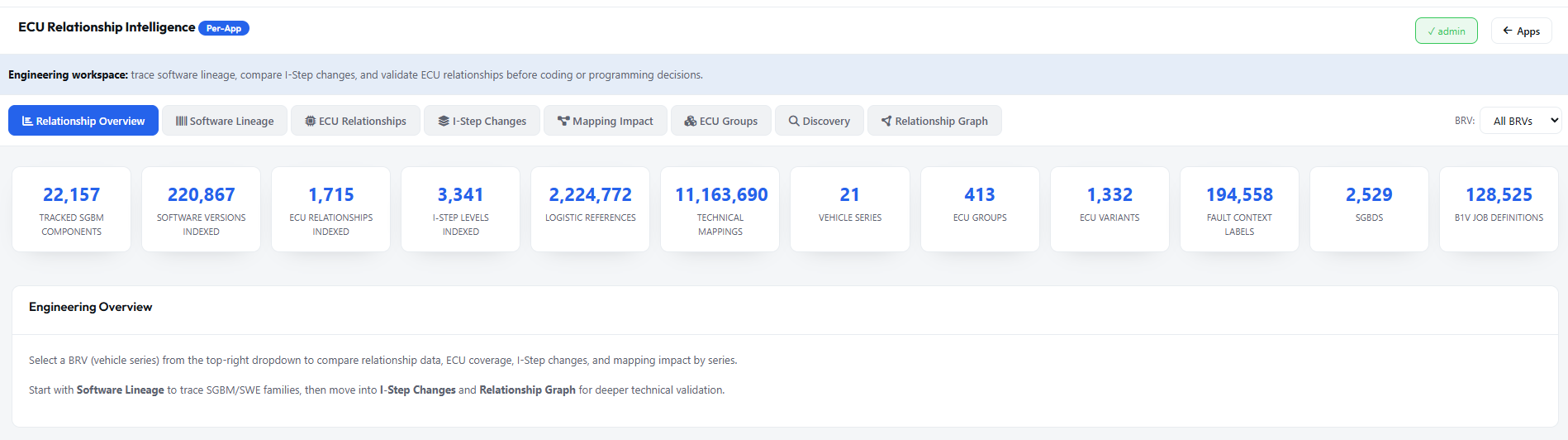
The first tab — a live summary of everything indexed from PSdZData.
Counters reflect the live data currently loaded. The BRV dropdown (top-right in the tool) filters all tabs to a specific vehicle series.
Software Lineage — Searching for an SGBM
The Software Lineage tab is the primary search interface for any SGBM component in PSdZData.
How to search
000056EA, 56EA, or a partial prefix). The search is case-insensitive. You can also search by description text."bootloader", "HU-MGU", or "DME". The search includes component descriptions indexed from the source data.
SGBM Detail Panel
Everything known about a single SGBM component — versions, hardware targets, release levels, vehicle parts, conditions, and related software.
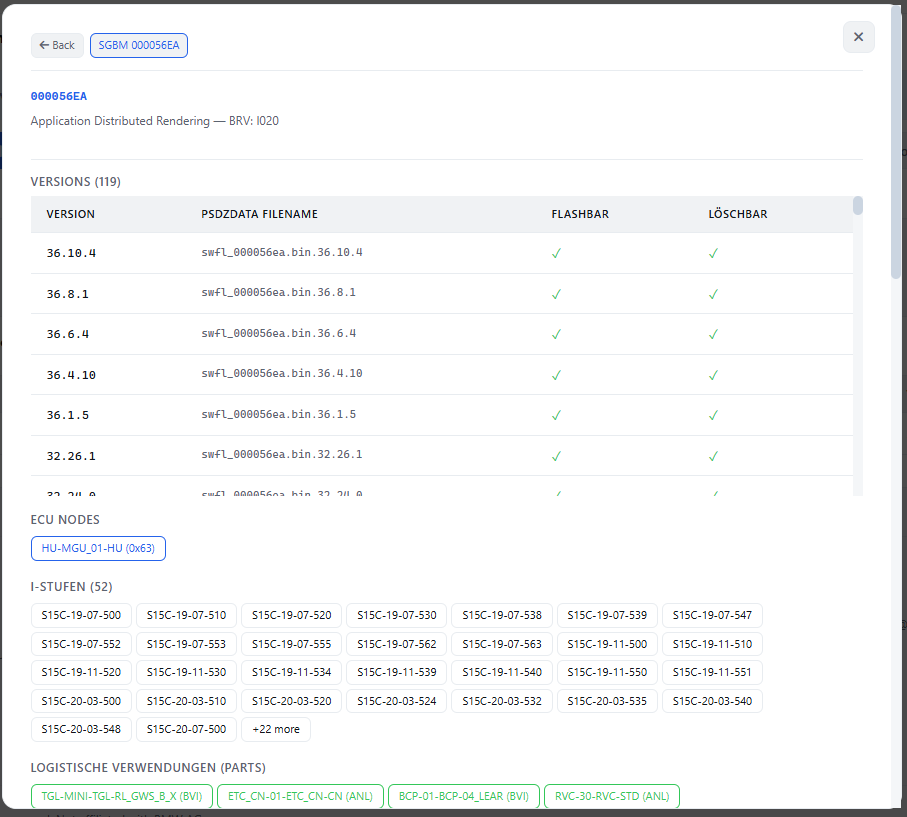
The example above shows SGBM 000056EA — a SWFL (flash image) for the HU-MGU_01 head unit, in the I020 vehicle series (BMW i20 MINI). The detail panel is divided into five areas: the header, Versions, ECU Nodes, I-Stufen, and Logistische Verwendungen. Below those, further sections cover Conditions, CAF Mappings and Related Components (documented in the next chapter).
Component Versions
All known versions of the selected SGBM component indexed by the tool.
For each SGBM, the tool tracks one or more versions — identified by a three-part version number (e.g. 36.10.4) and a corresponding filename (e.g. swfl_000056ea.bin.36.10.4).
Versions are sorted newest-first and the total version count is shown in the section header.
VERSION column
The three-part software version number (major.minor.patch). For SWFL components this matches the engineering version. For CAFD files it corresponds to the coding data revision.
FILENAME
The reference filename for this version — {type}_{id}.bin.{version} for flash images, or similar patterns for other types. Used as the unique identifier when referencing a specific version.
FLASHBAR / LÖSCHBAR
Flashbar (can be programmed) and Löschbar (can be erased) flags per version. A ✓ in both is the normal state for current SWFLs. Older versions may lose the Flashbar flag when superseded.
ECU Nodes & Addresses
The physical ECU target — which control unit carries this SGBM component, and its bus address.
The ECU NODES section lists every ECU hardware element (HWEL) that carries this SGBM component.
Each node is shown in the format ECU_NAME (0xADDR) — for example:
ECU Name component
The ECU name follows BMW's internal SGBD naming convention: {SYSTEM}-{VARIANT}-{BUS_POSITION}.
In the example HU-MGU_01-HU:
• HU = Head Unit subsystem
• MGU_01 = Media Gateway Unit variant 01
• HU = Head Unit bus segment
This identifies the logical ECU within the vehicle network topology.
Bus Address (0xADDR)
The hexadecimal UDS diagnostic address used to communicate with this ECU.
0x63 = decimal 99, the addressing byte used when sending diagnostic requests to the Head Unit.
This address comes from the HWEL record for this ECU variant. Multiple HWEL records for the same logical ECU (different hardware revisions) typically share the same address.
I-Stufen (Release Levels)
The complete list of BMW I-Step levels that include this SGBM component — the software's release history.
The I-STUFEN section lists every I-Step level in which this SGBM appears. Each I-Step is a production snapshot — a validated, consistent set of software versions approved for a specific vehicle production window.
Reading an I-Step identifier
Format: SxxC-YY-MM-NNN
Logistische Verwendungen (Parts)
The logistics parts table — which vehicle build variants reference this SGBM component as a deliverable part.
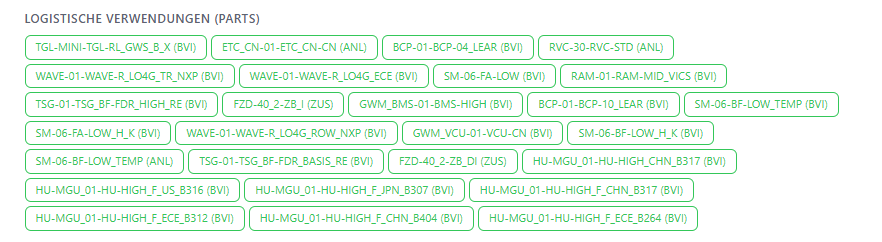
Logistische Verwendungen (literally: "logistic uses") are the BMW parts logistics entries that link a software SGBM to a physical delivery context — typically a vehicle variant defined by series, equipment line, market and production plant. Think of these as the "shipping labels" for the software: they say which vehicle configurations receive this component as a production part.
Reading a part entry
Each chip in the Logistische Verwendungen section follows the format {PART_ID} ({MARKET}). For example:
Part ID structure
The part ID encodes the BMW logistics hierarchy:
• First segment: subsystem code (e.g. HU-MGU = Head Unit Media Gateway)
• Variant number: 01 = first variant
• Description: equipment or hardware variant name (e.g. HIGH_CHN_B317 = High-spec China build BxX7)
This tells you exactly which vehicle equipment variant receives this SGBM.
Market / Region code
The code in brackets is the market identifier:
• BVI = Baureihenvariant Inland (domestic / standard market)
• ANL = Anlauf (production start / ramp-up version)
• ZUS = Zusatzausstattung (additional equipment)
Market codes determine which logistics regions receive this part — important for understanding regional software variants.
Usage Conditions
The shared condition model used throughout ECU Relationship Intelligence whenever a component has activation rules attached.
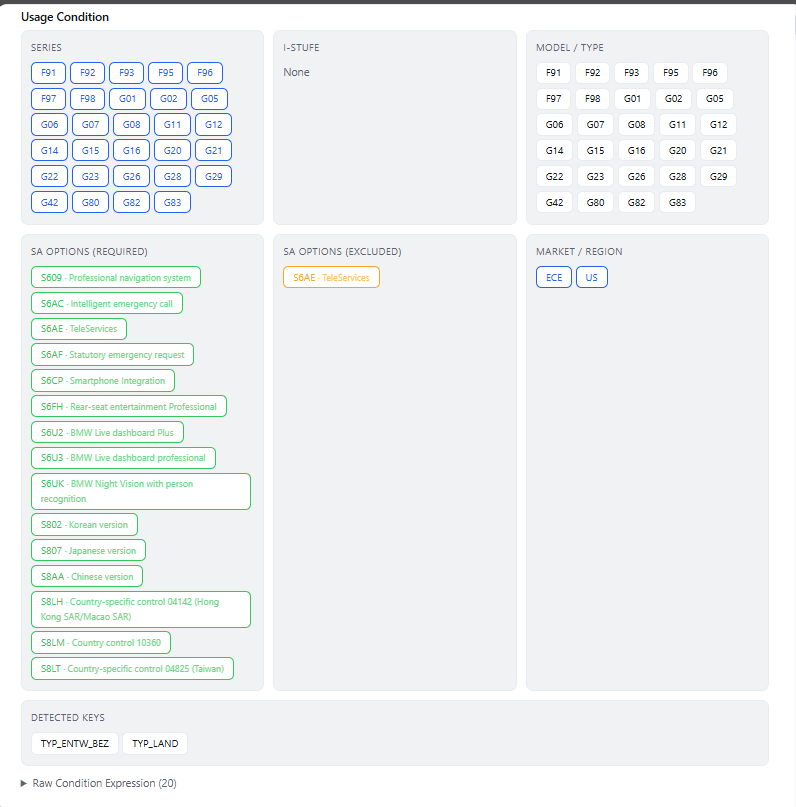
The Usage Condition panel appears throughout the tool whenever a component has activation conditions attached. Conditions define exactly when and for which vehicles a component applies — before a coding or programming job, these gates are evaluated against the actual vehicle configuration.
SERIES
BMW vehicle series codes such as F91, G01, G20 or S15A for which this component is valid.
I-STUFE
Specific I-Step levels required for the component. In many cases the value is None, meaning the component is valid for all I-Steps inside the allowed series range.
MODEL / TYPE
Vehicle model and type codes. This often mirrors the SERIES field but uses the BMW type table identifier instead of the BRV or platform label.
SA OPTIONS (REQUIRED)
Equipment and feature codes that must be present in the vehicle order. These are shown as green badges such as S609, S6AC, and S6CP.
SA OPTIONS (EXCLUDED)
Equipment codes that must not be present. These appear as amber or orange badges. If the vehicle has any excluded option, the component is filtered out.
MARKET / REGION
Geographic restrictions such as ECE (European Economic Area) or US (United States market), limiting where the component may be programmed or coded.
TYP_ENTW_BEZ (development designation) and TYP_LAND (country). These keys form the runtime evaluation input.
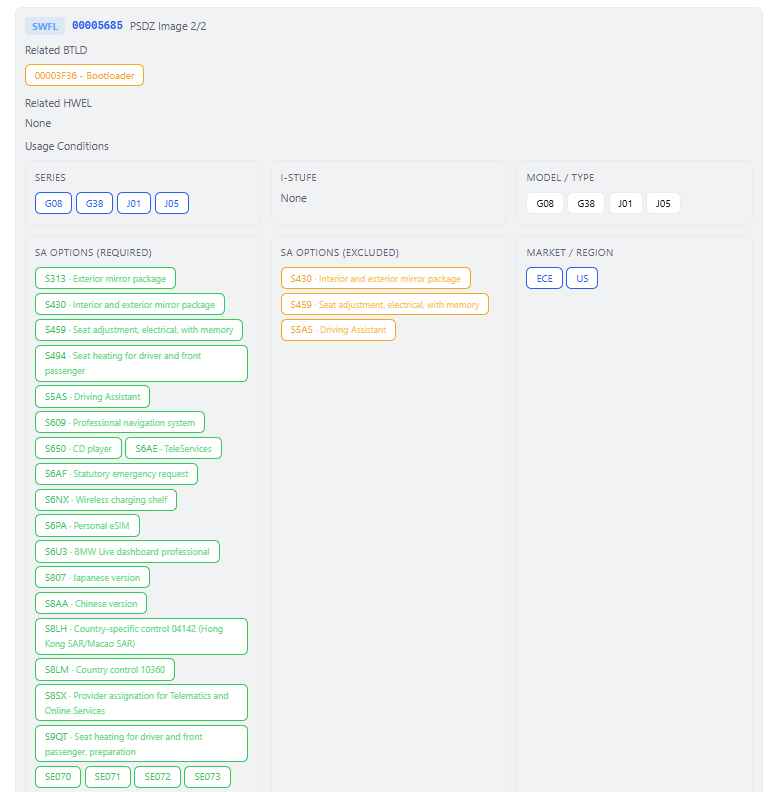
At the top of the SWFL panel, Related BTLD and Related HWEL chips identify the bootloader and hardware element required by that flash image. These quick links let you jump directly into the underlying bootloader or hardware dependency without leaving the ECU context.
(20) means 20 boolean terms. Expanding it reveals the full logic built from TYP_ variables and SA options.
CAF Mappings
How coding files connect to software components, and why CAFD compatibility matters before any flash or coding session.
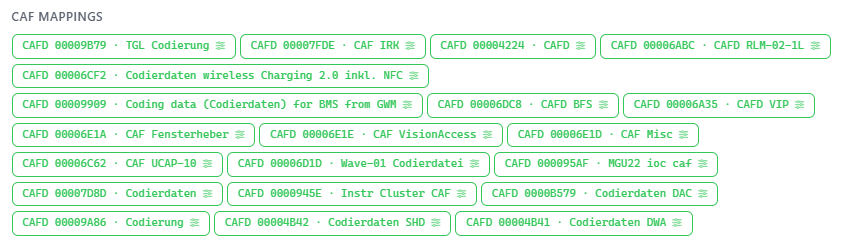
Each CAFD entry shows the SGBM ID and description of the coding file that references the selected software. Examples visible in the tool include CAF Fensterheber (window regulator), Wave-01 Codierdatei (coding data), and Codierdaten wireless Charging (wireless charging coding data).
Why CAFDs link here
A CAFD is tightly bound to the software version it was designed to configure. If the SWFL version changes, the CAFD may become incompatible. This section answers a critical workshop question: if I update this SWFL, which coding files are affected?
What to review
Use the mapped CAFD list to confirm whether coding data, vehicle options, and software revisions still align after a programming change. It is the fastest way to spot downstream coding dependencies before touching the car.
Searching ECU Nodes
Use the ECU Relationships tab when you want to start from the physical ECU instead of the software package.
The ECU Relationships tab provides a vehicle-centric view of the software landscape — instead of starting from a software component (SGBM), you start from the physical ECU and explore all software assigned to it.
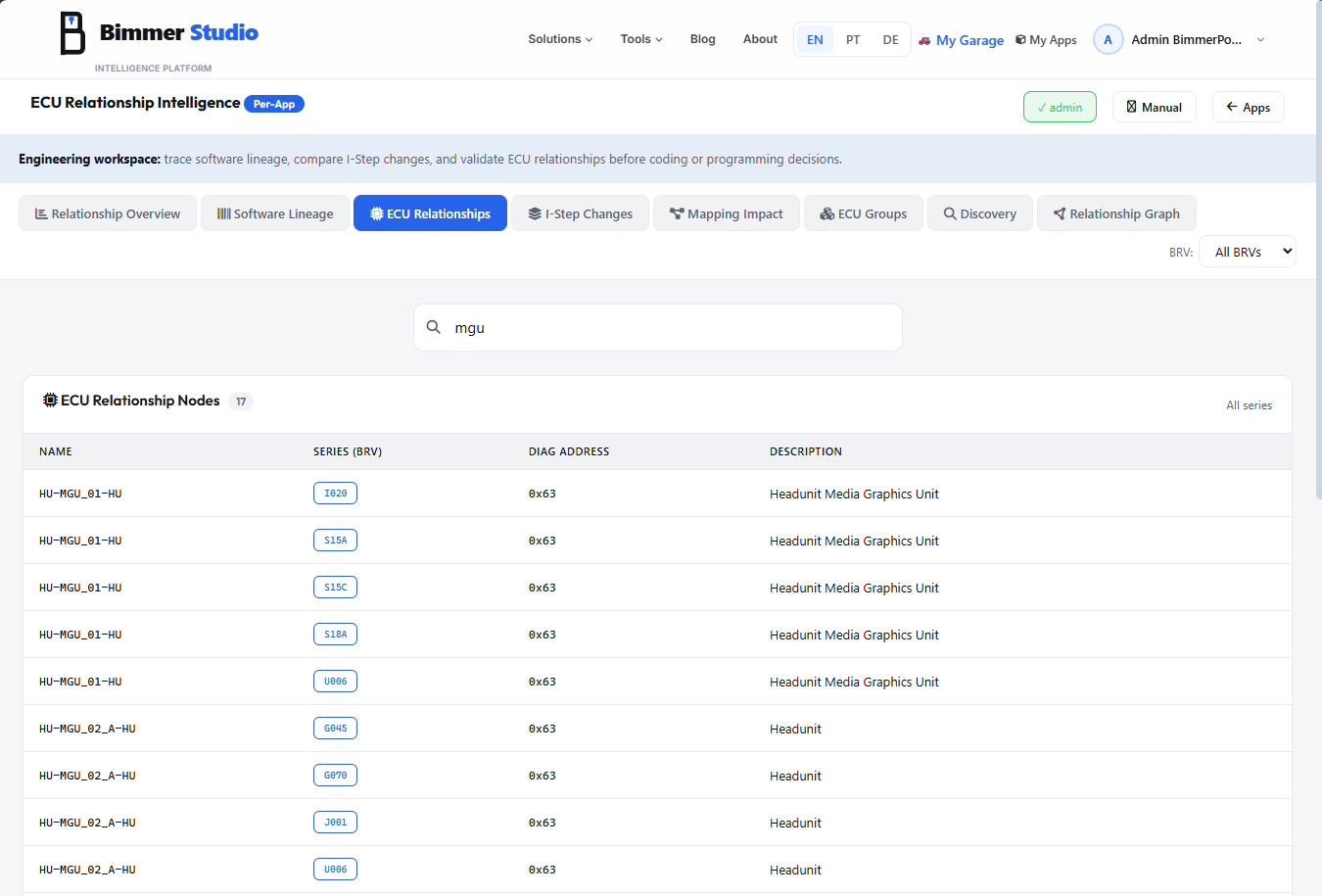
mgu, dme, atm, or hu. Results filter in real time.| Column | Meaning |
|---|---|
| NAME | ECU identifier such as HU-MGU_01-HU or HU-MGU_02-A-HU — the same naming convention used in ECU Nodes within Software Lineage. |
| SERIES (BRV) | The series badge this ECU belongs to, for example I020, S15A, S15C, S18A, U006, G045, G070, or J001. The same physical ECU may appear multiple times because software and conditions differ by platform. |
| DIAG ADDRESS | Hexadecimal UDS address such as 0x63. All HU-MGU variants share 0x63 regardless of series. |
| DESCRIPTION | Human-readable ECU function, for example Headunit Media Graphics Unit or simply Headunit. |
ECU Node Detail
The ECU detail panel combines physical identity, lifecycle range, assigned software count, and all vehicle applicability rules for that node.
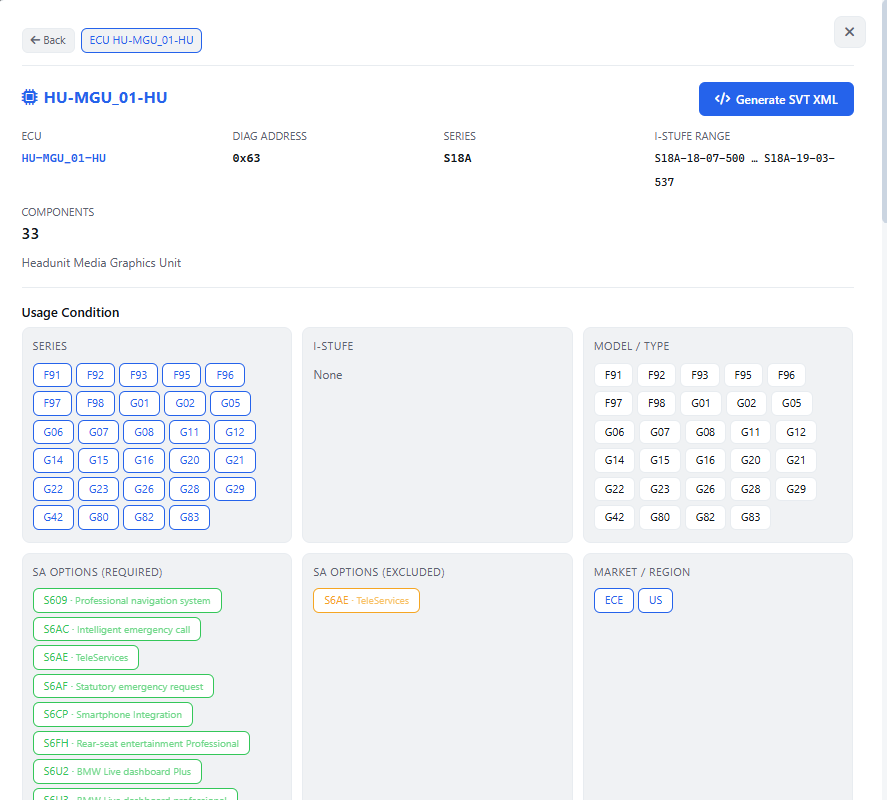
ECU
The ECU identifier itself. It is clickable and reloads the current panel, which is useful when you want to re-anchor the breadcrumb or copy the exact ECU name.
DIAG ADDRESS
0x63 — the UDS diagnostic address used to communicate with this ECU.
SERIES
S18A in this example — the platform or BRV to which this ECU instance applies.
I-STUFE RANGE
The lifecycle span in which this ECU/series combination is present, for example S18A-18-07-500 … S18A-19-03-537. This shows the release window of the ECU for that series.
COMPONENTS
The total number of SGBM components of any type associated with this ECU node — flash images, bootloaders, coding files, hardware records and more.
The description line gives the human-readable ECU function, such as Headunit Media Graphics Unit. The Generate SVT XML button exports a Software Version Table XML for this specific ECU, making it easy to document or import the exact ECU software stack into other diagnostic workflows.
Related SWFL Conditions
Drill deeper from the ECU into the individual flash images assigned to it, including their own bootloader and hardware dependencies.
Within the ECU detail panel, below the ECU Usage Conditions, the tool lists the related SWFL components for that ECU. Each SWFL can be expanded to reveal its own Usage Conditions, allowing you to compare ECU-level applicability against flash-image-level applicability.
PSDZ Image N/N
The indicator such as PSDZ Image 2/2 tells you which image slot you are viewing. Multi-image ECUs may carry separate application partitions, modem firmware, or region-specific payloads under the same ECU.
Related BTLD / HWEL
The Related BTLD chip shows the required bootloader, for example 00003F36. Related HWEL shows the targeted hardware element. A value of None means the SWFL applies across all hardware variants of that ECU.
I-Step Level List
The release history view for a selected BRV, showing how much software changed at each integration level.
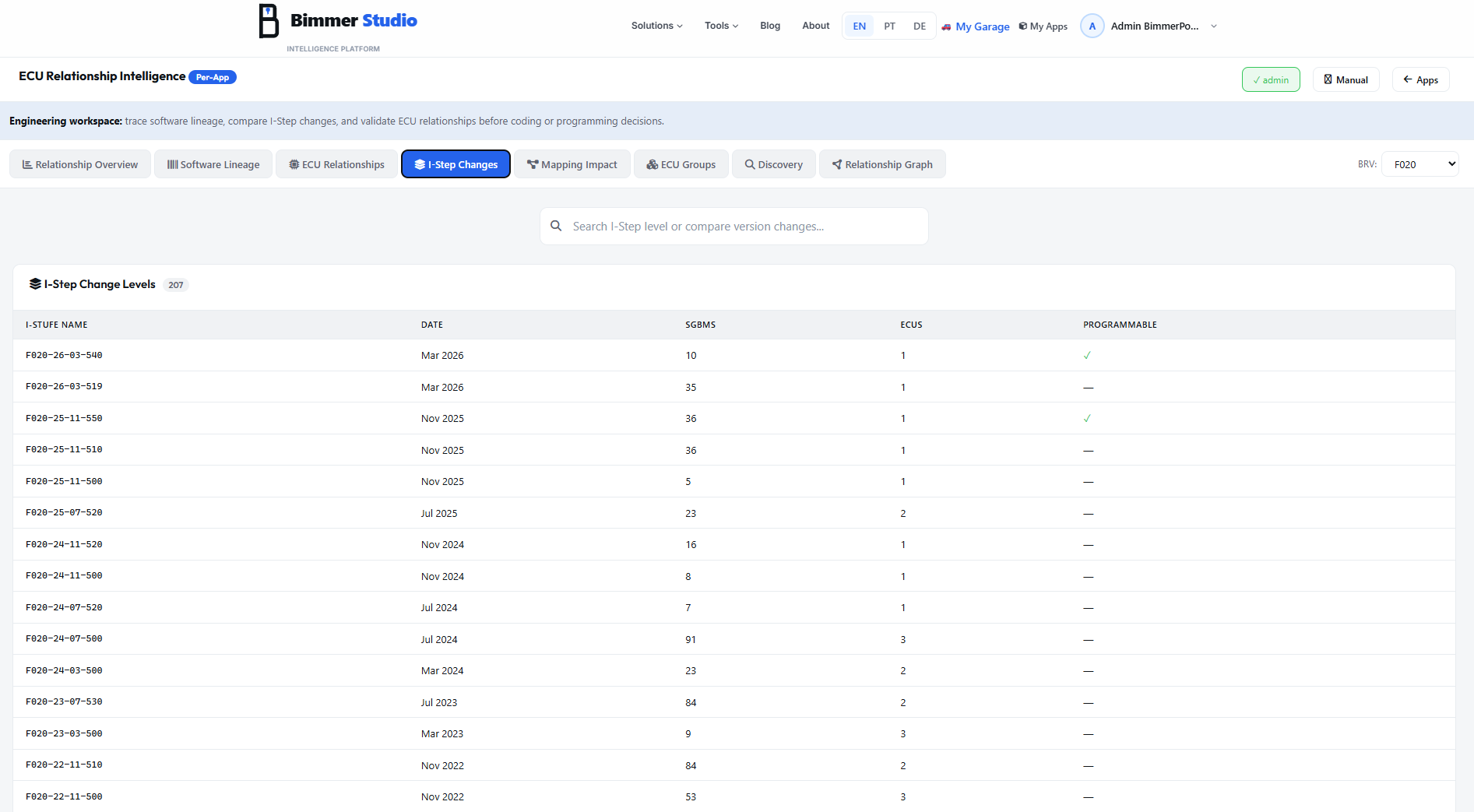
The I-Step Changes tab is your software release history for a specific BMW vehicle platform. Select a BRV in the top-right filter and the tool shows every I-Step level with a change summary. Although the UI can show All BRVs, the list becomes most meaningful when scoped to one platform such as F020, G01, or G20.
BRV filter
Choose a vehicle series like F020 (5 Series), G01 (X3), or G20 (3 Series). This determines which platform's release history is shown.
Search bar
Filter I-Step levels by text. For example, searching F020-26 isolates all March 2026 levels for the F020 platform.
| Column | Meaning |
|---|---|
| I-STUFE NAME | Full identifier such as F020-26-03-540 — BRV prefix plus year, month, and patch level. |
| DATE | Human-readable month and year, for example Mar 2026. |
| SGBMS | The number of SGBM components that changed in that I-Step level. |
| ECUS | The number of ECU nodes affected by the release. |
| PROGRAMMABLE | ✓ when the level includes at least one programmable component update such as SWFL or BTLD, and — when it contains only metadata or coding changes. |
I-Step Detail
Open one release level to see the exact software packages, ECU nodes, and logistics mappings introduced at that point in time.
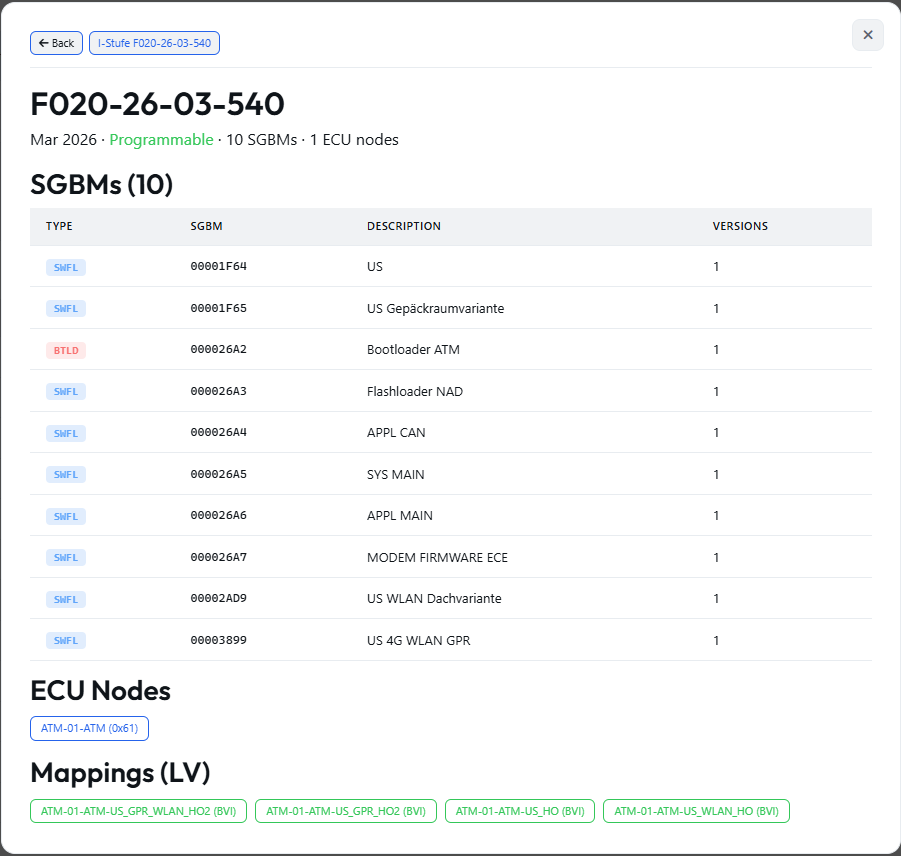
The detail header presents the I-Step name in large Outfit type, followed by the release date, a green Programmable badge, and a summary such as 10 SGBMs · 1 ECU node.
SGBMs table
The table lists each changed component with TYPE, SGBM ID, DESCRIPTION, and VERSIONS. Clicking any row opens that SGBM in Software Lineage. Typical ATM examples include BTLD 000026A2, SWFL 000026A3 Flashloader NAD, 000026A4 APPL CAN, 000026A5 SYS MAIN, and 000026A6 APPL MAIN.
Typical multi-image ECU structure
APPL CAN, SYS MAIN, and APPL MAIN illustrate the split software architecture common in telematics ECUs like the ATM (Advanced Telematics Module), where separate application partitions and modem firmware are versioned independently.
ECU Nodes
The ECU Nodes section shows clickable chips for the control units changed by this release, for example:
Clicking a chip opens the ECU detail view documented in Section 18.
Mappings (LV)
The Mappings section lists the logistics vehicle references attached to this I-Step, such as delivery contexts or vehicle variants receiving the update:
ECU Drill-down
Move from a release snapshot into one ECU without losing the surrounding I-Step context.
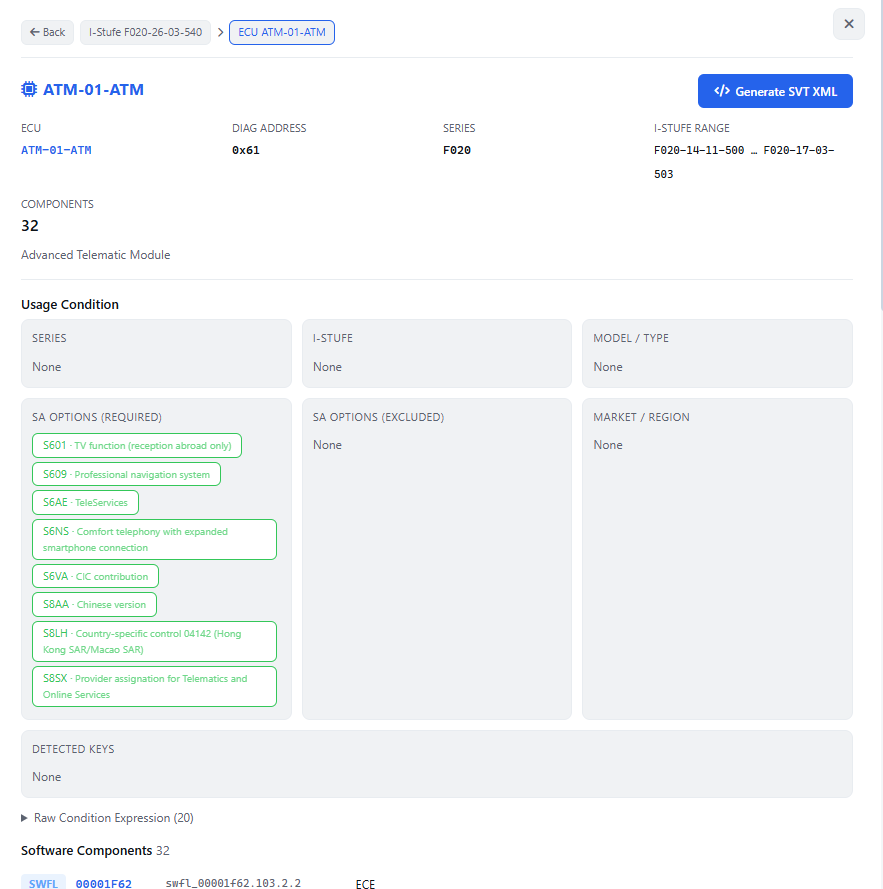
Core fields
ECU: ATM-01-ATM
DIAG ADDRESS: 0x61
SERIES: F020
I-STUFE RANGE: F020-14-11-500 … F020-17-03-503
What ATM means
ATM stands for Advanced Telematics Module — the connected-services and SIM module. Address 0x61 is the dedicated UDS address for the telematics unit, and the I-Step range shows its full lifespan in the F020 platform.
In this context, the Usage Condition section is driven entirely by SA options.
Required equipment includes S6AE (TeleServices), S609 (Professional navigation), S6VA (CIC contribution), S6NS (Comfort telephony), S8AA (Chinese version), S8LH (Country-specific control), and S8SX (Provider assignation for Telematics).
Series, I-Stufe, Model, and Market are all None, meaning this ECU variant is gated purely by option content.
Mapping References
The logistics layer that links ECU and software configurations to specific vehicle build variants.
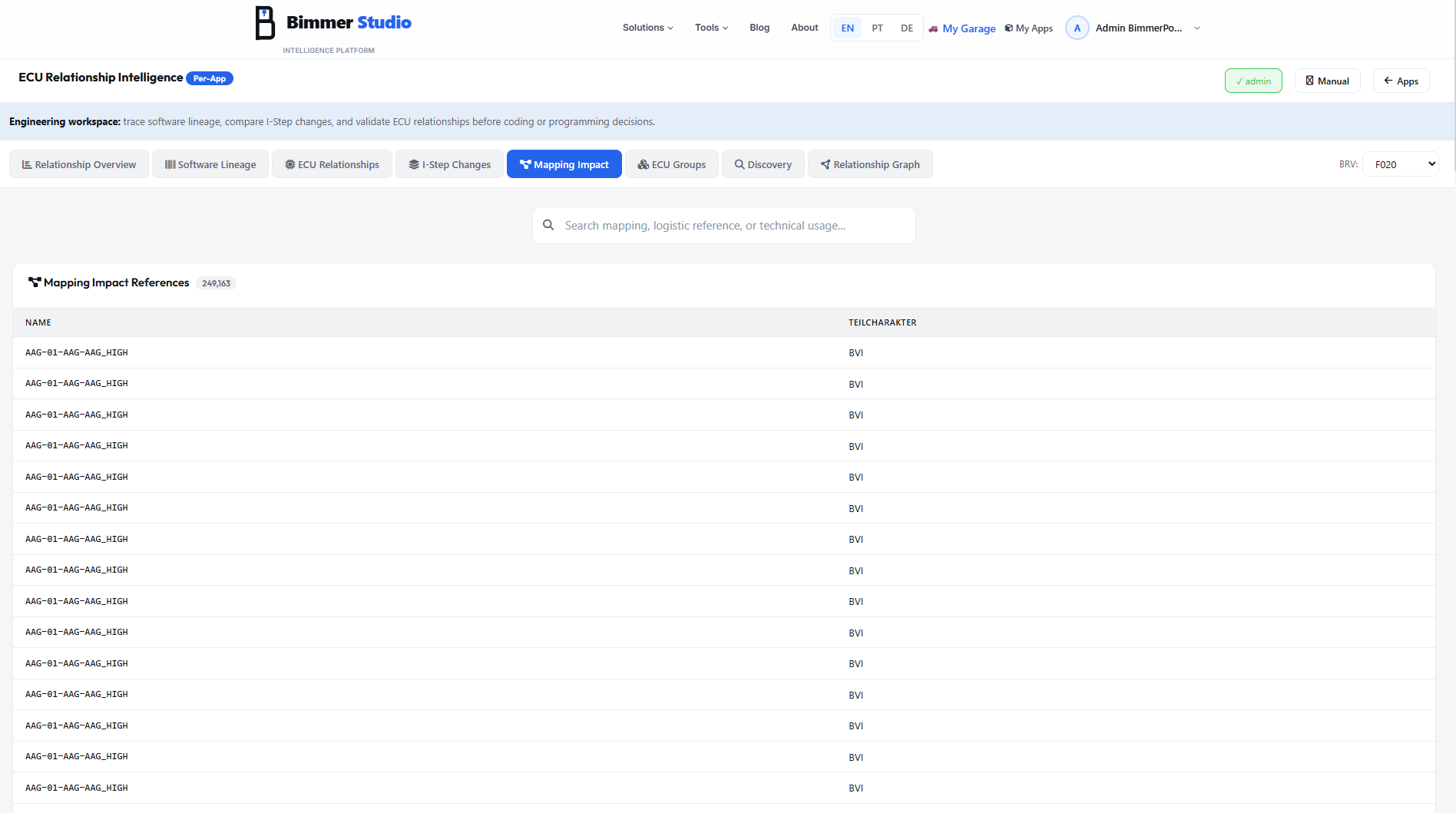
The Mapping Impact tab exposes the complete logistics mapping table — the bridge between software components and the vehicle production variants that carry them. Each row is a Logistisches Verwendung reference, and for F020 alone the tool tracks 249,163 of these software-to-vehicle assignments.
Search works by mapping name, logistics reference, or technical usage string.
| Column | Meaning |
|---|---|
| NAME | The mapping identifier in the form {ECU}-{VARIANT}-{DESCRIPTION}, for example AAG-01-AAG-AAG_HIGH or DME-841-DME-BASIS. |
| TEILCHARAKTER | The logistics type or part character. BVI means Baureihenvariant Inland (standard production delivery). Other examples include ZUS (additional equipment) and ANL (ramp-up or start of production). |
Mapping Detail
Decode one logistics mapping to understand exactly which vehicle variants it covers and which software payload it delivers.
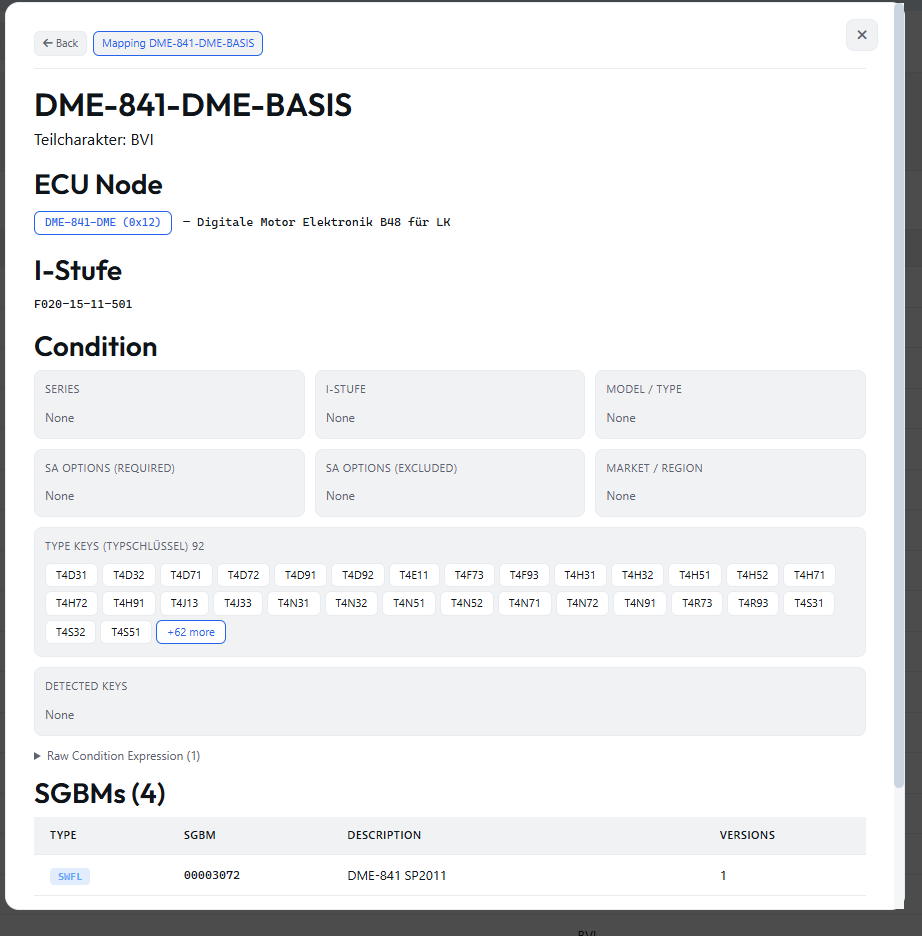
Breadcrumb: Back → Mapping DME-841-DME-BASIS
Name
DME-841-DME-BASIS decodes as DME (Digital Motor Electronics), 841 (variant number), DME (system), and BASIS (base variant).
Teilcharakter: BVI
ECU Node
DME-841-DME (0x12) — Digitale Motor Elektronik B48 für LK. This is the engine control unit for the B48 engine in this application context, with UDS address 0x12.
I-Stufe: first appearance such as F020-15-11-501.
TYPE KEYS (TYPSCHLÜSSEL)
The type key grid lists all production TYPE codes covered by the mapping — for example T4D31, T4D32, and T4D71 — with 92 visible and +62 more collapsed in the screenshot.
A TYPE code is a 4-character production variant identifier. The full list determines exactly which vehicle orders receive this ECU and software configuration in the production logistics system.
DETECTED KEYS shows the extracted TYP_ variables from the condition expression, if any are present.
SGBMs
The SGBMs table lists the actual payload assigned by this mapping — type, SGBM ID, description, and version count. A typical entry is SWFL00003072 — DME-841 SP2011.
ECU Group Families
The ISTA diagnostic grouping layer that organizes ECU variants into shared SGBD families.
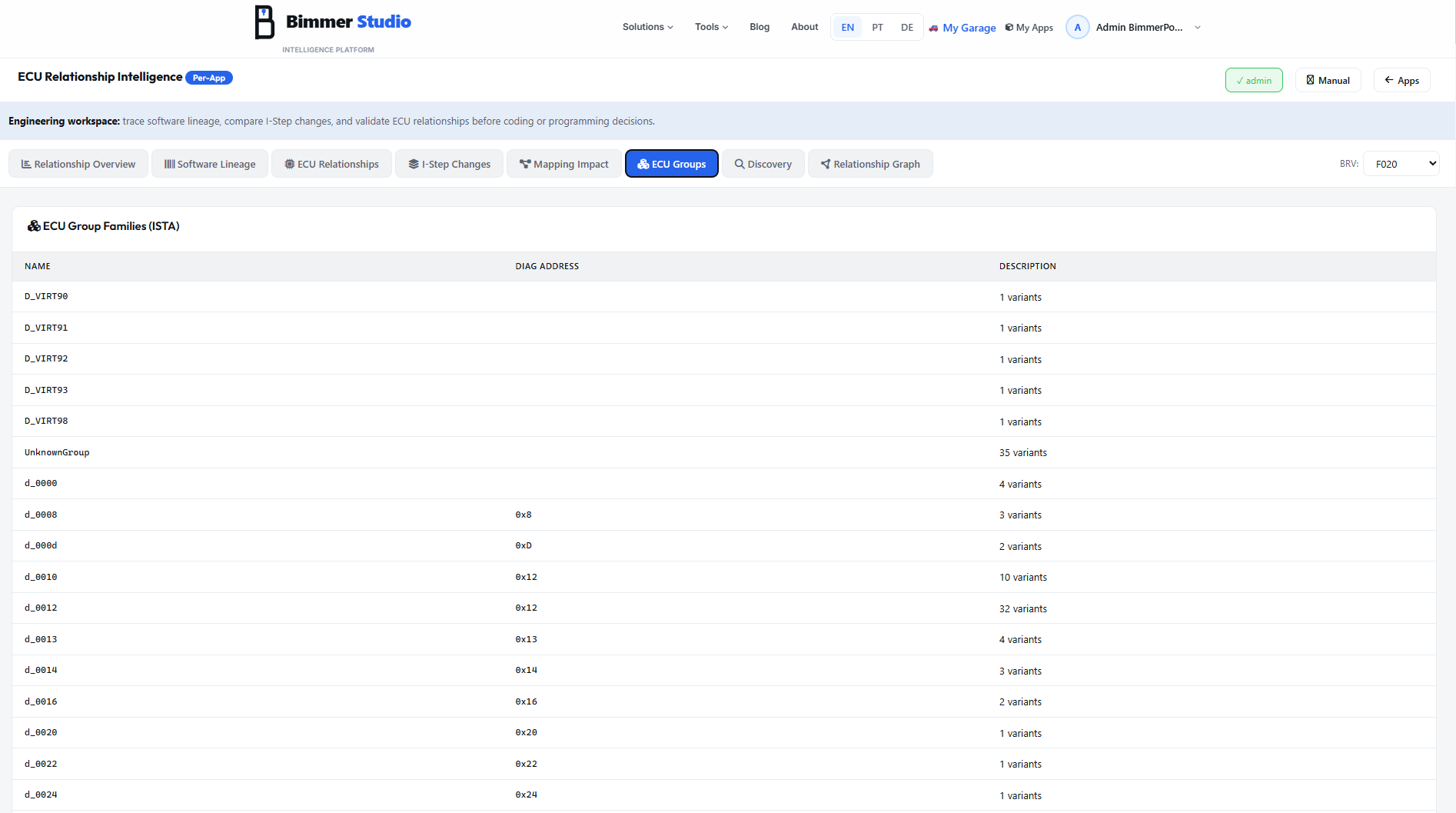
The ECU Groups tab exposes the SGBD families used by ISTA. SGBD stands for Steuergerätebeschreibung — ECU Description — the diagnostic definition file that tells ISTA how to communicate with an ECU. One SGBD group can cover multiple hardware variants of the same logical ECU family, along with its fault memory definitions, coding functions, and test plans.
| Column | Meaning |
|---|---|
| NAME | The SGBD group identifier. Real ECUs often use d_{address_hex} such as d_0012 for address 0x12. Others use descriptive names like g_mmi, virtual names such as D_VIRT90 to D_VIRT98, or UnknownGroup. |
| DIAG ADDRESS | The ECU's hexadecimal diagnostic address. This is blank for virtual groups because they do not represent a physical control unit. |
| DESCRIPTION | The group summary, typically expressed as the number of variants it contains, such as 32 variants. |
D_VIRT90 through D_VIRT98 are virtual ISTA groups for internal diagnostic processes such as key management or security routines. UnknownGroup with 35 variants means the ECU variants exist in the data, but could not be mapped to a known SGBD family.
Group & Variants
Inspect one diagnostic family to see all ECU variants and how fault coverage changes between generations.
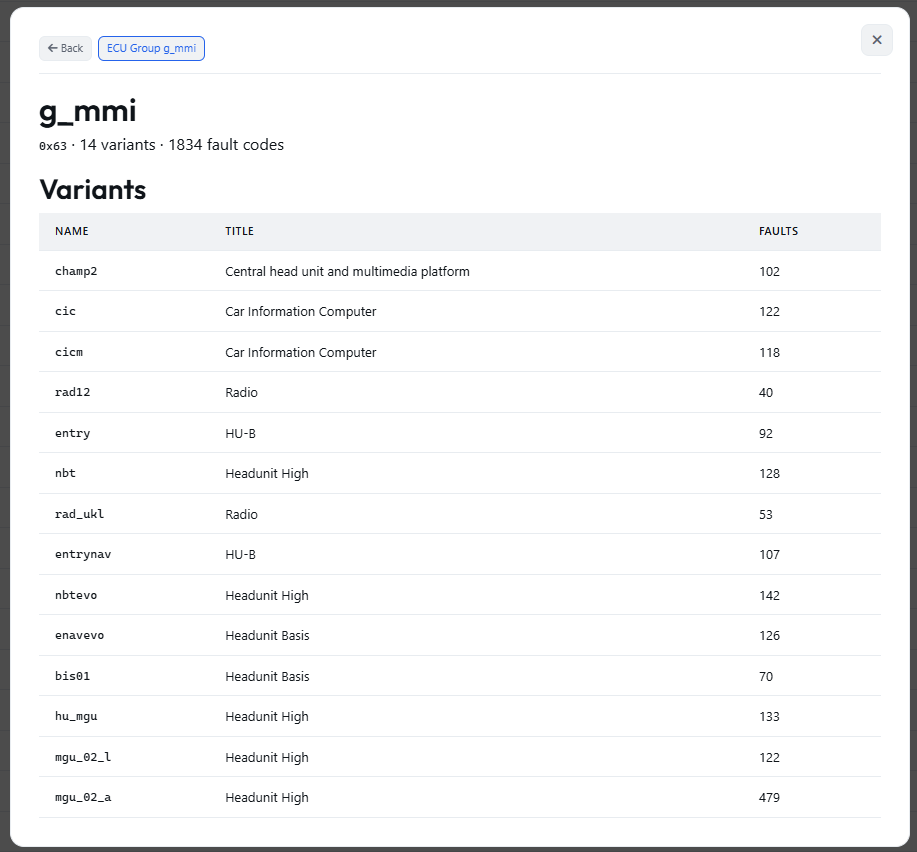
Group header
g_mmi, address 0x63, 14 variants, and 1834 total fault codes.
g_mmi stands for Großes Multimedia Infotainment — the SGBD family for the main infotainment and head-unit ECU at address 0x63. It spans multiple generations from early CIC and NBT hardware through today's MGU variants.
| Name | Title | Faults |
|---|---|---|
| champ2 | Central head unit and multimedia platform | 102 |
| cic | Car Information Computer | 122 |
| cicm | Car Information Computer | 118 |
| rad12 | Radio | 40 |
| entry | HU-B | 92 |
| nbt | Headunit High | 128 |
| rad_ukl | Radio | 53 |
| entrynav | HU-B | 107 |
| nbtevo | Headunit High | 142 |
| enavevo | Headunit Basis | 126 |
| bis01 | Headunit Basis | 70 |
| hu_mgu | Headunit High | 133 |
| mgu_02_l | Headunit High | 122 |
| mgu_02_a | Headunit High | 479 |
Fault Codes & DTC Explorer
From one ECU variant's fault memory to the full multilingual DTC database across all BMW ECU families.
Variant detail
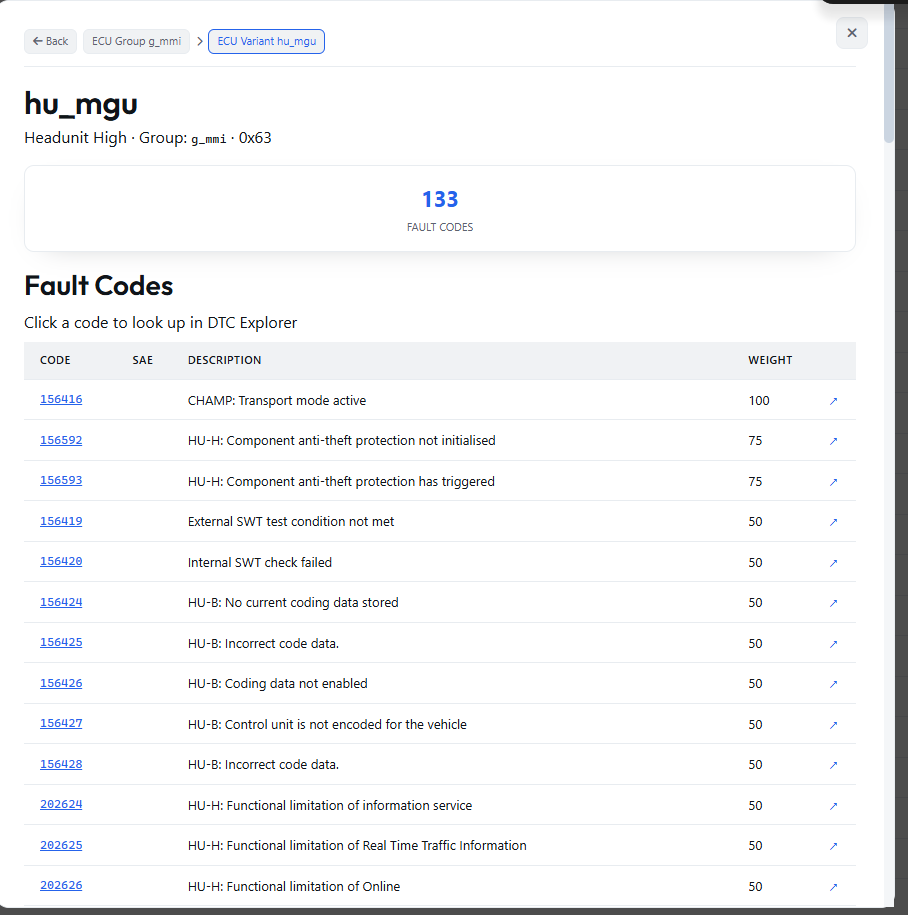
The breadcrumb reads Back → ECU Group g_mmi → ECU Variant hu_mgu.
hu_mgu means Headunit Media Graphics Unit — a Headunit High variant inside the g_mmi family at address 0x63.
This variant exposes 133 fault codes.
Fault Codes table
Each row shows the decimal CODE, an SAE code where available, a human-readable DESCRIPTION, and a WEIGHT. Weight indicates severity or priority in ISTA diagnostic flows — higher values are more critical.
Typical examples
156416 = CHAMP transport mode active (weight 100); 156592 and 156593 = component anti-theft protection (weight 75); 156424 to 156428 = common HU-B coding errors (weight 50).
Messages such as HU-B: No current coding data stored, HU-B: Incorrect code data, and HU-B: Coding data not enabled are typical indicators of an ECU that has not been coded correctly or is running mismatched coding data. Each code row includes a ↗ action that opens that code in the DTC Explorer.
DTC Explorer
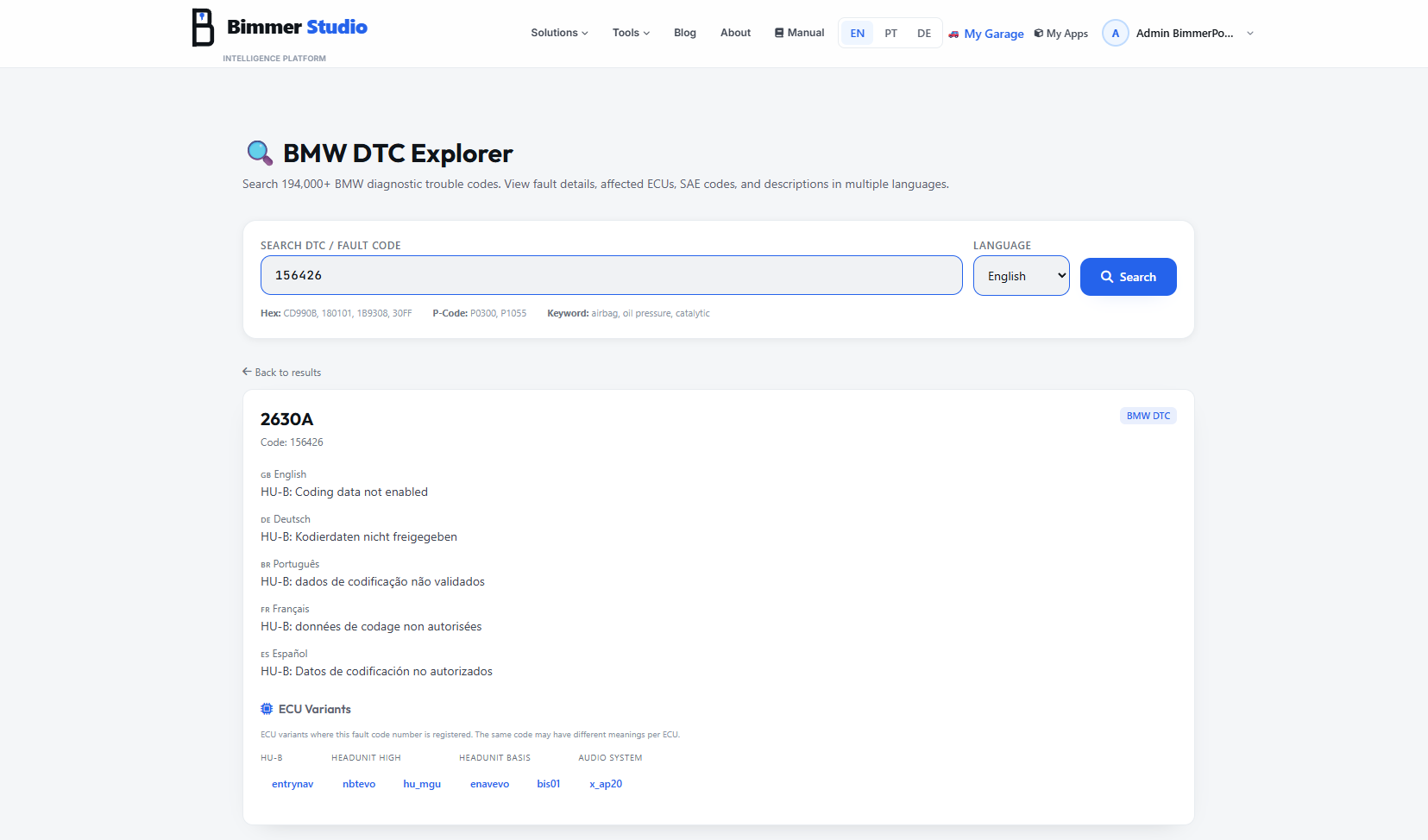
DTC Explorer opens as a separate full page — not a modal — and is also accessible as a standalone Bimmer Studio tool from the main navigation.
You can search by decimal DTC number, BMW fault code, hexadecimal code such as CD990B, 180101, 1B9308, or 30FF, as well as standard P-codes such as P0300 and P1055.
Result example
DTC 2630A corresponds to decimal code 156426.
English: HU-B: Coding data not enabled
Deutsch: HU-B: Kodierdaten nicht freigegeben
Português: HU-B: dados de codificação não validados
Français: HU-B: données de codage non autorisées
Español: HU-B: Datos de codificación no autorizados
ECU Variants section
The ECU Variants block shows every SGBD variant where the fault code exists, including families like HU-B, HEADUNIT HIGH, HEADUNIT BASIS, and AUDIO SYSTEM. Typical variants include entrynav, nbtevo, hu_mgu, enavevo, bis01, and x_ap20. The same numeric code can carry a different description depending on the ECU variant.
Discovery Tab
A universal search workspace — find any ECU, SGBM, I-Step, mapping or condition reference from a single entry point across all series simultaneously.
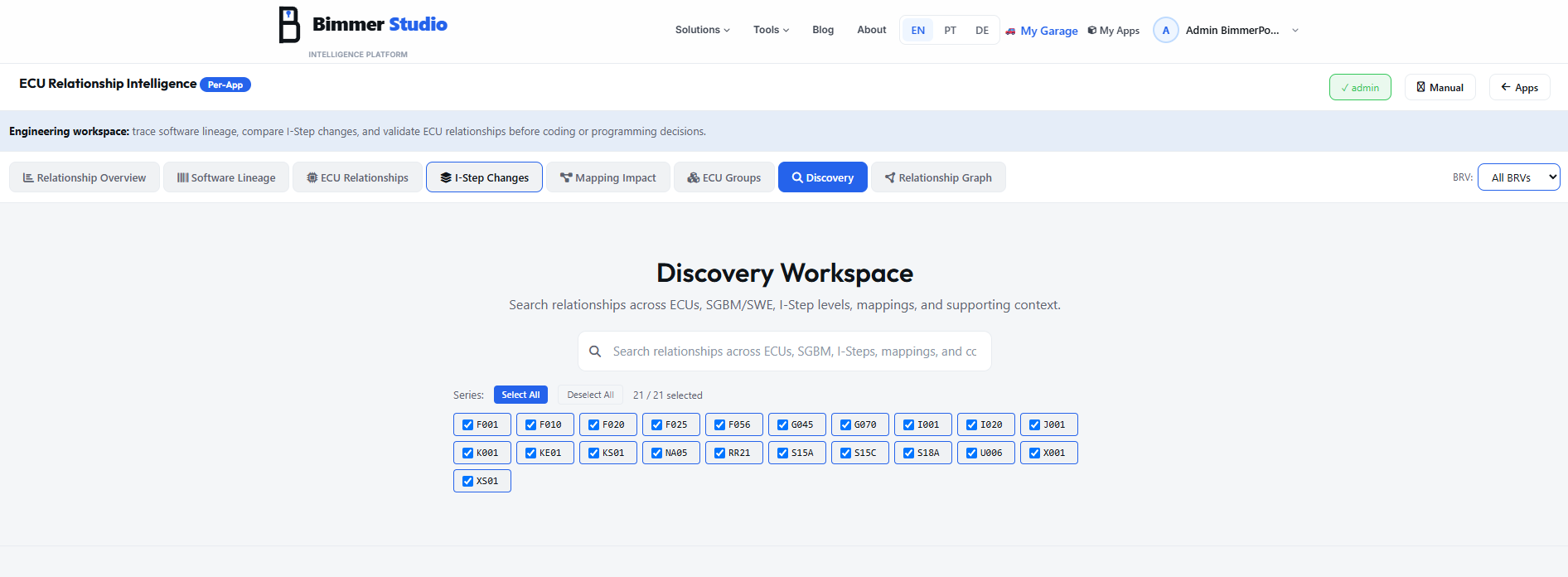
The Discovery Workspace is the broadest search tool in the suite. Unlike the other tabs which are structured around a specific data type, Discovery accepts any ECU-related string and returns matches across every data category simultaneously — SGBMs, ECU nodes, I-Step identifiers, logistic mapping names and descriptions. It is the fastest way to answer "what is this code?" or "where does this string appear?" without knowing the data type first.
Series filter
Below the search bar, a Series checkbox grid lets you narrow the search to specific BMW platforms. By default all 21 series are selected — covering the full range of supported platforms:
Use Select All / Deselect All to toggle quickly, or click individual series badges to focus on one platform. The result count updates in real time as you change the selection.
Search results
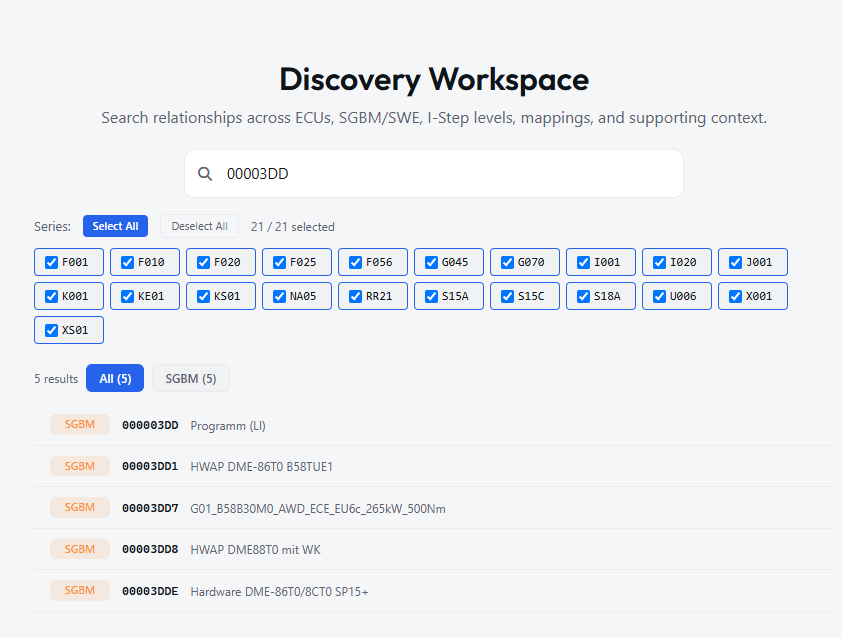
Results are grouped by data type with a tab bar at the top: All (N) and per-type tabs (e.g. SGBM (5)).
Each result row shows the type badge, the matched identifier, and the description. In the example above, searching 00003DD returns:
What you can search for
- SGBM IDs — full or partial (e.g.
00003DD,56EA) - ECU names (e.g.
HU-MGU,ATM-01) - I-Step identifiers (e.g.
F020-26) - Logistic mapping names (e.g.
DME-841) - Description text (e.g.
Bootloader,B58) - Engine/ECU codes (e.g.
B58TUE1,MG1)
Result types returned
- SGBM All SGBM types (SWFL, HWAP, BTLD…)
- ECU ECU node matches by name
- I-Step I-Step level identifier matches
- Mapping Logistic reference matches
Clicking any result opens the full detail panel for that item — same panel as if you had navigated to it directly from the dedicated tab.
Result detail
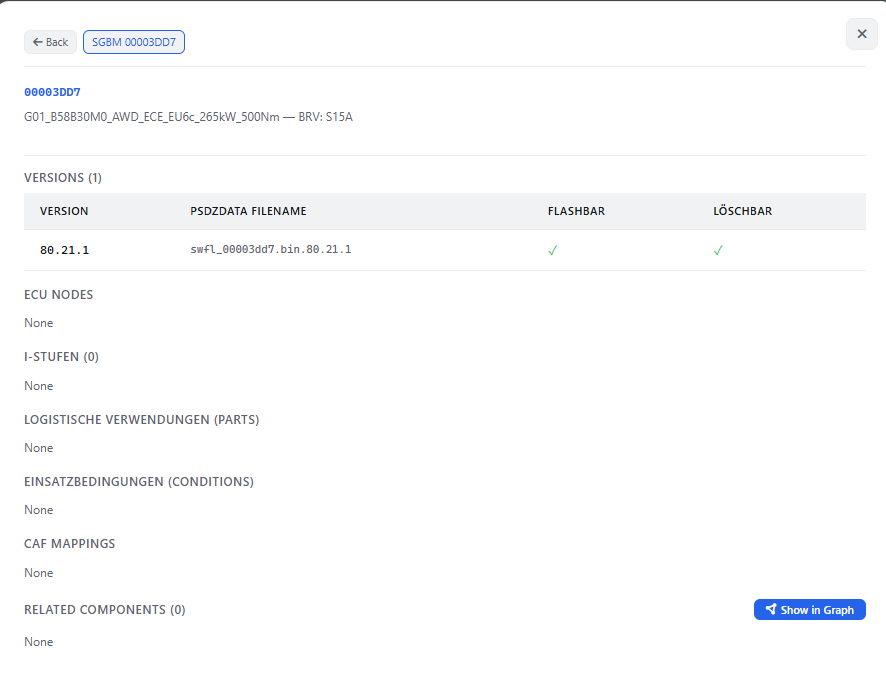
Clicking a result opens the full SGBM detail panel — identical to the Software Lineage detail view. All sections are present: Versions, ECU Nodes, I-Stufen, Logistische Verwendungen, Einsatzbedingungen, CAF Mappings, and Related Components with the Show in Graph button.
Relationship Graph
An interactive visual graph of all SGBM relationships for any component — explore the dependency network at a glance.
The Relationship Graph renders the complete dependency network of any SGBM as an interactive force-directed node graph. Enter any SGBM number in the search bar, and the graph instantly plots all connected components — flash images, bootloaders, flash keys, hardware elements, ECU nodes — as colored circles connected by edges that represent the dependency direction.
Graph overview
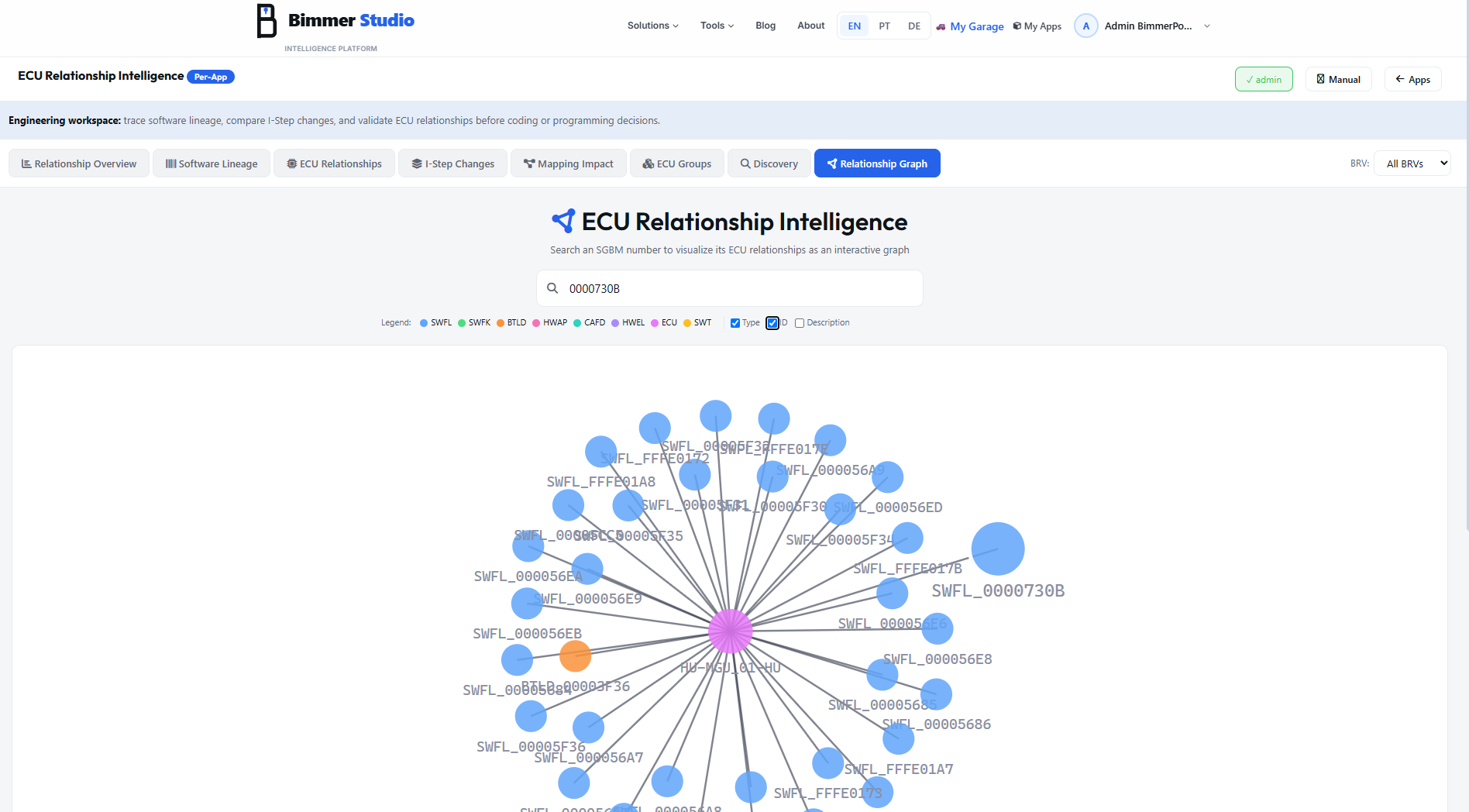
Node colors (legend)
Node size meaning
Node size is proportional to connection count — the more components a node links to, the larger its circle. This makes shared infrastructure immediately visible:
- A large BTLD node means that bootloader is shared across many SWFLs — typical for platform-wide bootloaders
- A large SWFK node means many flash images use the same encryption key — relevant for hardware families
- A small isolated node is a component with very few connections — potentially a variant-specific or deprecated component
Clicking a node — drill into its cluster
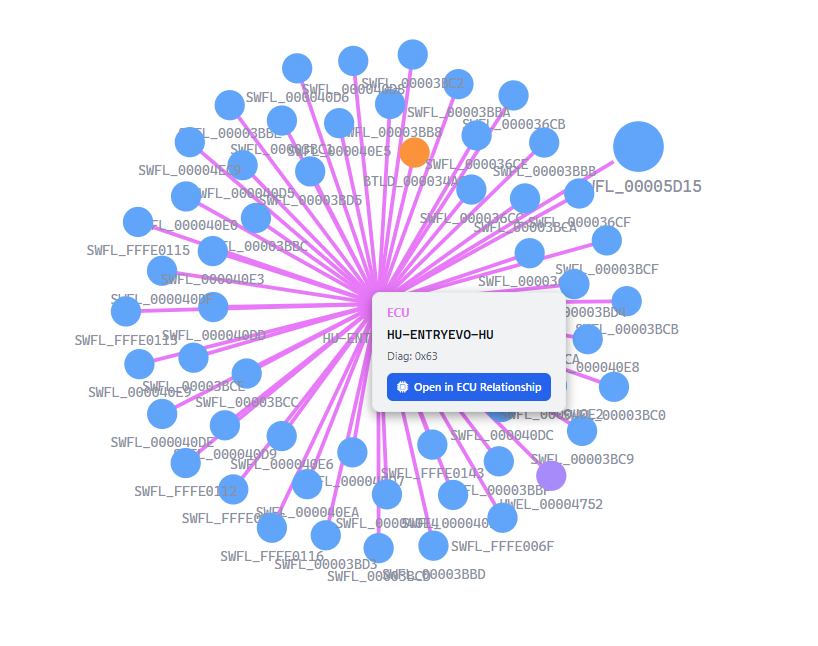
Clicking any node in the graph opens a small popup card showing the node type, SGBM or ECU identifier, and the diagnostic address (for ECU nodes). The popup has an "Open in ECU Relationship" button — clicking it navigates to the ECU Relationships tab with that ECU pre-selected, allowing you to inspect conditions, components and usage in full detail.
Label display controls
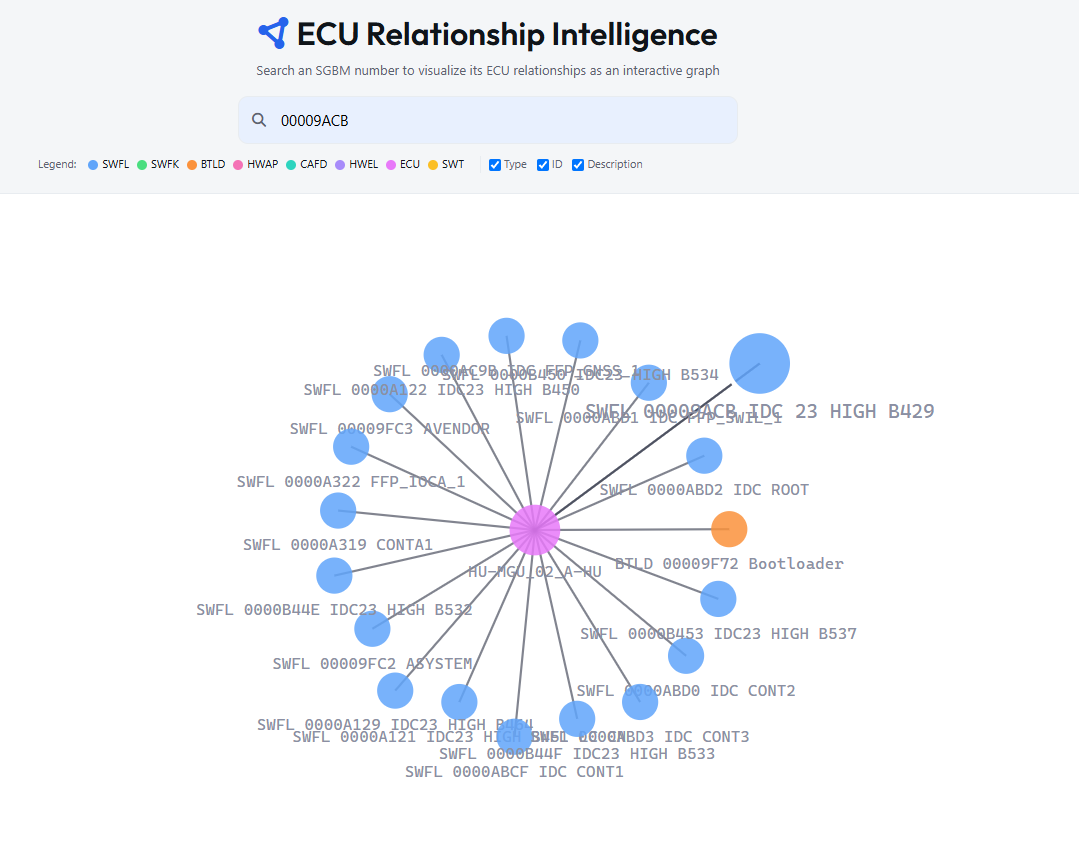
The legend bar below the search box contains three checkboxes that control what text is displayed on each node:
☑ Type
Shows the SGBM type prefix on each node — SWFL, SWFK, BTLD, HWAP, CAFD, HWEL, ECU, SWT. Useful for quickly identifying component categories without reading the ID.
☑ ID
Shows the 8-digit SGBM identifier or ECU name on each node. On by default. Disable to reduce label clutter when the graph has many nodes (30+).
☑ Description
Shows the human-readable description alongside the ID — e.g. "IDC 23 HIGH B429", "Bootloader", "FFP_LOCA_1". Most useful for identifying functional purpose at a glance. Can be toggled off for dense graphs.
- Find all SWFLs that share the same BTLD — enter the BTLD ID, the graph shows every flash image connected to it. A large orange node surrounded by many blue nodes is the visual signature.
- Find all SWFLs using the same SWFK — enter the SWFK (flash key) ID, the graph reveals the full flash image family that uses that encryption key. Critical before a key rotation.
- Trace a specific SWFL's full dependency tree — enter the SWFL ID and see its ECU node (pink), bootloader (orange), flash key (green), and all peer SWFLs that share those dependencies.
- Identify isolated or orphaned components — a node with zero or one connection in the graph may indicate a deprecated, test, or incomplete SGBM entry.